Frequently asked questions

On this page you’ll find an overview of questions that are asked frequently. Contact us if yours isn’t included.

The Mary Magdalene and Jesus World School

Are you on social media?

See our Contact page for an overview of all the social media channels we are active on. We’d love to meet you there as well!

How often do you send out a newsletter?

We aim to send a newsletter twice a month. When there is a lot of news, we send out a newsletter more often. As we ourselves are guided by Mary Magdalene and Jesus, new revelations also come as a surprise to us!

What does a certain word or phrase mean exactly?

See our Glossary page for an overview of often used terms with their explanations.

Do you offer subsidies?

Besides occasional book promotions we don’t offer discounts. We have been carrying out our mission at our own expense for more than 20 years. Each week we invest in translating and formatting books, a user-friendly website, etc. In order to work internationally, we now also call on paid experts.

How can I support the Mary Magdalene and Jesus World School?

There are many ways in which you can support our mission and work, including donations, translations, becoming an ambassador, social media and technical assistance. See the page How you can help for more information.

How can I become a trainer?

We offer courses for people interested and qualified to become trainers of the New World Programme teachings by Mary Magdalene and Jesus. See the page Trainer courses to learn more.

When do you plan to hold physical meetings in English and in other countries?

The Mary Magdalene and Jesus World School is developing rapidly! Sometimes we cannot keep up the pace… It is our wish to organise physical meetings internationally as well. It is best to subscribe to our newsletter so that you are kept informed about this.

Our webshop

Why are various prices displayed per book?

The prices of books are based on the sales price in the Netherlands and include the Dutch VAT tariff of 9% as a default. The price you will pay may be different and depends on the VAT tariff in your country. Therefore, only in the final stage of your purchase, when you enter your shipping address, the total price will be calculated automatically.

Another reason for the variety in prices has to do with the different formats. A paperback edition versus ebook for example.

What are your shipping conditions?

We ship our books worldwide and we choose the most suitable parcel service for each country. Our logistical handling depends on the product purchased and the delivery address and country. For example:

  • For shipments sent from our stock in the Netherlands, we usually choose DHL.
  • Books can also be sent elsewhere from a local printer directly to your address: in that case, the delivery time is on average 8 working days.

If the items you order are in stock, we aim to ship within one working day. We cannot be held responsible for the time taken by parcel services for delivery. Due to the high cost of transport in relation to the price of the book, we have chosen not to offer track and trace shipping outside the Netherlands (headquarters) as a standard.

You will receive an automatic e-mail message when your order has been completed, which means that your book is in shipping.

Be aware! For online events, for which you receive a ticket with a link to participate via Zoom, and an email reminder before the start of the event.

Fixed shipping costs

For every order, we charge a flat rate for shipping costs, regardless of the country of delivery. For orders over 35 euros, this amount is waived. This happens automatically at the checkout of your shopping basket in one order. The shipping costs will therefore be waived only within a single order transaction.

When will my order be delivered?

We always do our best to deliver as quickly as possible. In addition to our internal organisation, we also rely on external partners worldwide. Delivery times vary from 4 to 9 working days. If your order has not been received after 9 days, please send us a message so we can check the status.

I made a mistake in my order. What to do?

Please send us an email about this as soon as possible, within the same working day of your order, stating your order number and the new address or desired change so we can try to resolve it.

What is your return policy?

You have the right to cancel your order up to 14 days after receipt without giving any reason. You have another 14 days to return your product after cancellation. You will then be credited the full purchase price.

If your order is processed in the meantime, you are responsible for the shipping costs of returning your package. If you exercise your right of withdrawal, the product will be returned to Mary Magdalene and Jesus World School with all delivered accessories and – if reasonably possible – in its original condition and packaging.

To exercise this right, please contact us by e-mail with a photo of the product attached and stating your order or invoice number. We will then refund the order amount due within 14 days of your return provided the product has been received back in good order. Please check our Terms and conditions first.

I received the wrong item.

That’s annoying. Please contact us about this as soon as possible with all the information, including your order number with us.

I would like to order something which is not (yet) available. Now what?

We are working hard to offer all books and services in five languages. Please send us an e-mail stating what you would like to order. We can then let you know when we expect to be able to offer it. Thank you in advance for your interest!

Where can I find your general terms and conditions?

Please see this page for an overview of our general terms and conditions.

What are your opening hours?

We are a small but growing company attracting people worldwide from 2023. Our webshop is open 24/7, but no visiting address and we work with different warehouse locations. We do not have the capacity yet to set up an international call centre for customer queries. We can be reached via email until we are a bit bigger. Emails will be answered during working days (Amsterdam CET). We thank you in advance for your understanding and patience.

Ebooks

What is een ebook?

An ebook is a digital file, such as a Word document or a PDF. The file contains the full content of a printed book. What’s more, the font size can be adjusted, ensuring that every book is easy to read for everyone.

How can I read ebooks?

Our ebooks are available in the widely supported ePUB format. Ebooks are best read on an ereader like Amazon Kindle, Boox, Kobo, Pocketbook, and ReMarkable, but can also be read on other devices such as a computer, laptop, smartphone and tablet. You can use special software for this, such as: Adobe Digital Editions, Calibre, FBReader, Freda, Sigil, and Sumatra PDF.

Online healing sessions

At what time do online healing sessions start?

Online healing sessions in English mostly start at 8.00 PM Amsterdam time (Dutch healing sessions start at 7:30 PM).

How to prepare for a healing session?

Our healing sessions are powerful meetings with Mary Magdalene and Jesus, Mary and Joseph, and in their company the Archangels, the Representatives for the Human Divinity and Nature, the Pillars of Creation, Mother Earth, Nature Beings and various groups of spiritual healers, among others.

Zoom

We advise to enter Zoom meetings 10 minutes before they start. You may have to wait in the “Waiting room” after clicking the Zoom link before being admitted. Please be patient.

You will receive a ticket email with a Zoom link after ordering and about 45 minutes before the start of the event. If you are not familiar with Zoom, please ask a friend in advance to assist you. Also have a look at the Zoom section of this FAQ further down this page.

Preparations

We advise you to have a light meal a few hours before the meeting.

To make optimal use of the healing, it is nice if you have a place near your computer, laptop or smartphone where, after our introductory part of the evening, you can lie down to undergo and integrate the treatment. For example, on a bed, sofa or mat. Use a blanket to keep yourself warm.

It is recommended that you wear easy-fitting clothes, take off your glasses and watch and remove or loosen any tight straps. Shoes should preferably be taken off.

Pets can be left in your surroundings provided they are calm in nature. Possibly they will respond to the energy field with reassurance and/or be involved in the healing. Feel for yourself what feels best for you. You know your pet best.

Please inform housemates or expected visitors that you do not want to be disturbed during the healing session. If you live with more people, please make sure you have a separate room available for you for this meeting.

Online events using Zoom

How can I participate in an online event?

Once you have registered and paid for an event through our webshop, you will receive an email to confirm your purchase and an additional ticket email with the Zoom link. On the day of the event, about 45 minutes before the start, you will receive an additonal email with the Zoom link.

I have no experience with Zoom. How does it work?

We use Zoom as a platform to hold our online events. Unfortunately it is impossible for us to support participants technically with their computers or with Zoom. We therefore advise everyone to familiarise themselves with Zoom before the event starts, or by asking a friend or neighbor for help.

You do not need an account to participate in a Zoom event. Clicking on the Zoom link in your email will open a website that launches the Zoom player. You can install it on your device in advance via zoom.us/download.

See the Zoom website for more information about participating in Zoom events.

I have not received any email with a Zoom link

You will receive an email with a Zoom link after ordering and about 45 minutes before the event starts.

First check that your order is complete: is your shopping basket empty? Have you received an email confirmation that you have paid? If you entered a correct email address, you will receive an email after your transaction with the Zoom link.

If necessary, check that your Internet connection is working properly. And always check if the email you were expecting ended up in your spam box, or if you (accidentally) blocked our mail address info@marymadaleneandjesus.com on your computer.

If after the above checks you still have not received any mail, please contact us and describe your question with as much concrete information and references as possible. We will answer it as soon as we can.

If you have registered and paid for an online event, you will automatically receive the recordings afterwards, even if you could not participate live.

How to prevent the Zoom link from going to your spam box in the future?

Search for our email with the Zoom link, left or right click on the sender email address and add it to your address book or whitelist.

My Zoom link does not work

With each event you will receive a new, unique and valid Zoom link, so please verify that you are using the correct link.

Check that your internet works correctly.

Copy and paste the received Zoom link in your web browser. Or enter the received Zoom meeting ID (the last numbers in the Zoom link) in https://zoom.us/join.

Depending on your computer’s settings, you may be asked by your web browser before joining the Zoom session if microphone and webcam access is allowed.

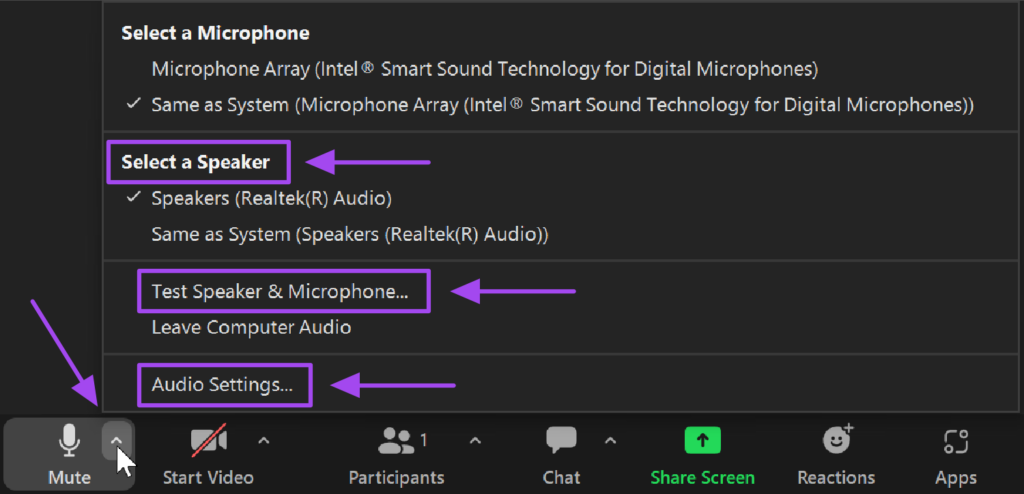
My sound does not work. I can’t hear anything.

There could be several reasons for this:

  • Nothing is said: then we are busy preparing or are still on mute. There are also deliberate silences during the meditation or healing.
  • By default the participants are muted (the microphone is crossed out at the bottom left of the bar), so it is normal that you will not hear other participants then.
  • Your computer settings are not yet correct (you see someone speaking that is not on mute). Then open your computer’s volume settings and ensure that everything is on.

If this doesn’t help, turn your computer off and back on again, and then try to join the Zoom session again.

I hear an echo

There may be multiple devices joining the Zoom session in the same room (e.g. you are logged in on both your phone and computer). Turn off the volume on one of the devices, or turn one device off completely.

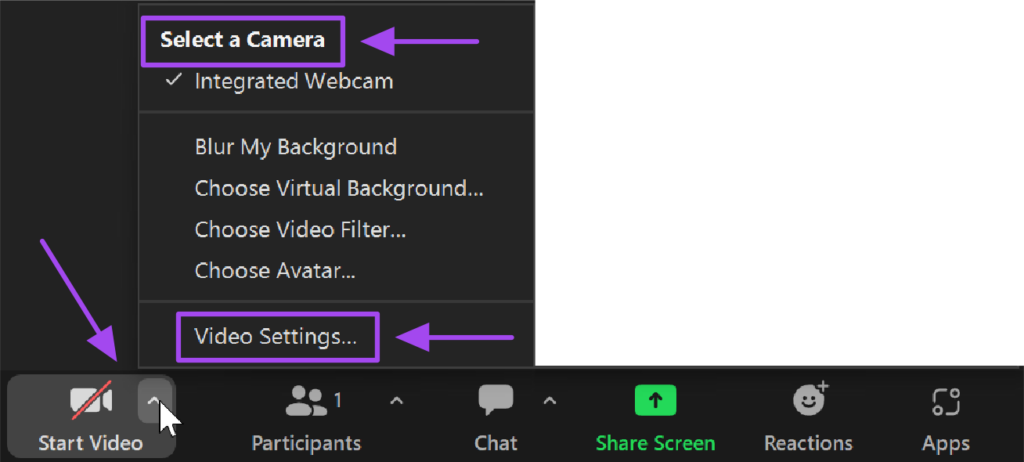
I have sound but no picture

Can’t you see yourself?

There are computers that do not have a camera. Then you stay out of the picture because there is nothing you can do about it.

Some computers have a ‘slider’ before their webcam, which might be closed.

Your camera may be turned off in Zoom, which you can tell by the line through the camera icon in the lower left corner of the bar. By clicking this, you turn your camera on and you are visible to others.

In the Zoom settings, you can choose your view. Click on Views and select your favorite.

If you have a camera, but within Zoom you don’t get the problem solved, go to your computer’s settings. Go to Bluetooth and Devices to check your camera settings.

I urgently want to ask or share something. How can I do it?

During online events, the group is often large, sometimes over 300 people. For our setting of meditation, healing and spiritual development, a serene atmosphere and calmness is appropriate.

There is an opportunity to ask urgent questions at the beginning of events. To do so, please use the Reactions button at the bottom of the bar by clicking on the ‘Raise hand’ icon in Zoom.

Enterprise customers

I would like to order large quantities for my company

Our website is dedicated to private customers. If you have a company and would like to order large quantities, please contact us before ordering.